
Priority Matrix
What is a priority matrix?
Section titled “What is a priority matrix?”A priority matrix is table of two columns and two rows. It’s a tool intended to help you prioritize or make a decision. The most famous example is the Eisenhower method, made famous by the USA President Dwight D. Eisenhower:
"I have two kinds of problems, the urgent and the important. The urgent are not important, and the important are never urgent."
The idea is simple, each task is evaluated using two different categories and then placed in the associated quadrant. The placement determines how to task will be handeled.
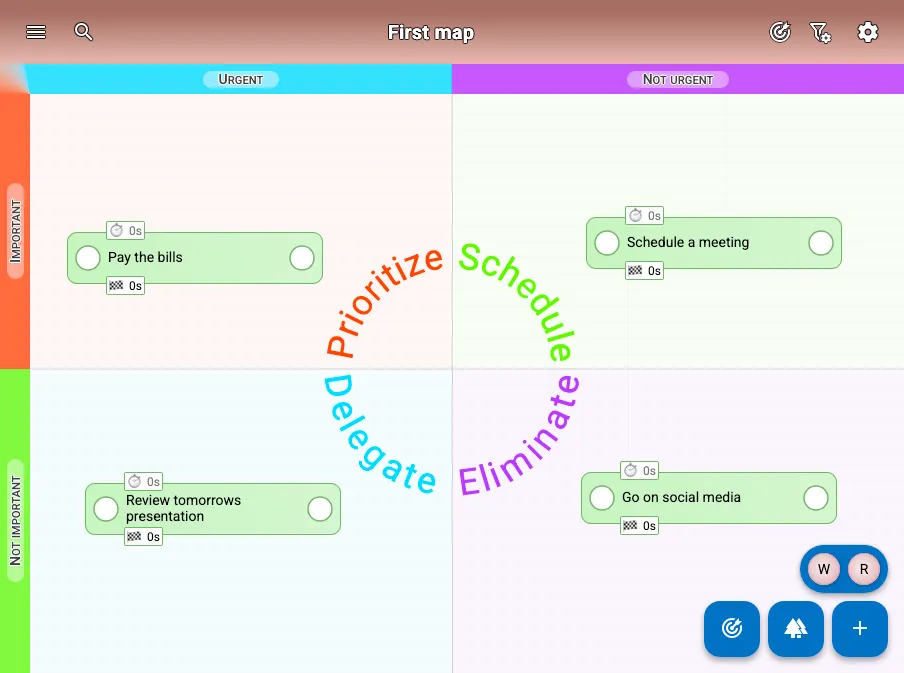
Editing a priority matrix
Section titled “Editing a priority matrix”Each map has it’s own priority matrix which is disabled by default. Go the settings of the map and enable “Priority Matrix”. The default priority matrix is Eisenhower Priority Matrix, but by expanding the options, you can load another template or edit the priority matrix.
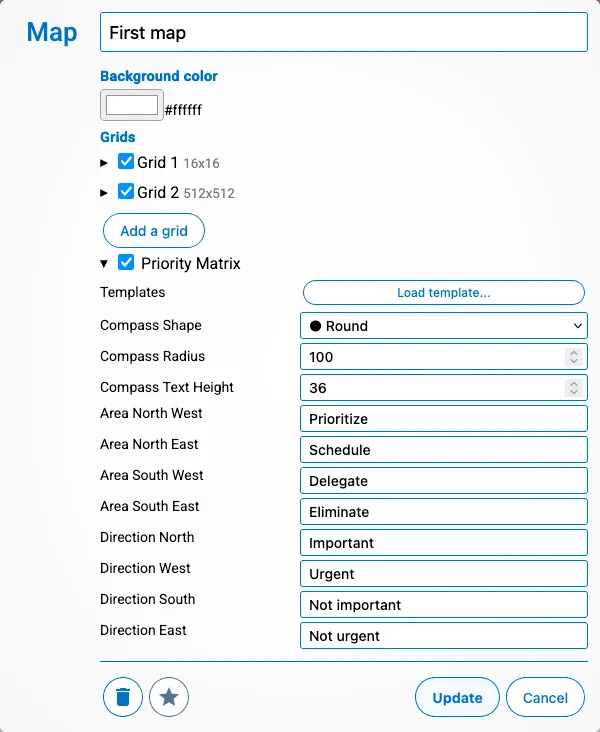
When you expand the options you can modify the following:
- “Load template…” - This will show you a list of all default templates you can load
- Compass Shape - How should the labels for the area be displayed
- Hidden - No text is displayed
- Diamond - The text for each area together forms a diamond
- Round - The text for each area together forms a circle
- Star - The text for each area together forms a four pointed star
- Compass Radius - The distance of the text from the center
- Compass Text Height - The size of the text
- Area North/South West/East - The four labels shown in the compass for each quadrant
- Direction North/South/West/East - The four labels shown around the edge of the map for each direction.
Advice on how to use a priority matrix
Section titled “Advice on how to use a priority matrix”A priority matrix should be used when you need to prioritize. It’s recommended to create a new map for it and use another map to do the day to day work. Simply search or create a task and place it. By using another map to work on you can keep an overview of what is important by only keeping the high level tasks. Since all tasks are shared, completing a task on another map will result in the task being completed on the map with the priority matrix.
The default templates
Section titled “The default templates”The following default templates are provided:
- Eisenhower
- When to use: When you have problems and need to determine how they are handeled (and by who)
- Areas: Prioritize, Delegate, Schedule, Eliminate
- Directions:
- Important vs Not Important
- Urgent vs Not Urgent
- PICK Chart
- When to use: When you need to make impact and want to select high value targets that can be done quickly
- Areas: Implement, Possible, Challenge, Eliminate
- Directions:
- “High Payoff” vs “Low Payoff”
- “Hard to do” vs “Easy to do”
- Simple Matrix
- When to use: When you have a schedule and need a flexible solution to determine which tasks are picked up
- Areas: Focus, Next, Schedule, Ignore
- Directions:
- “High Priority” vs “Low Priority”
- “Now” vs “Later”